Skip to content

Google Ads · reporting + an AI analyst

Your data knows something.

adsecrets turns your Google Ads account into clear answers: a bilingual dashboard, an AI analyst that explains what is happening and what to do about it, and a read-only connection you can query straight from Claude or ChatGPT.

You authorize through Google's own consent screen, with your own Google account. We never ask for your password — and you can disconnect at any time.

From a pile of data — the one thing that matters

Search term · high spend, zero conversionsNoise

The problem

Budget moves faster than insight.

Anyone running Google Ads knows the feeling. The interface is deep, the reports are dense, and the only question that actually matters — what is working and what is burning money — stays open until the month closes.

  • 01

    The spend lands before the signal does

    By the time you spot the search term burning budget without converting, it has already burned it.

  • 02

    The picture is scattered

    Keywords here, impression share there, invoices somewhere else. No single screen holds the whole answer.

  • 03

    It reads like an API, not a report

    Metrics named after API fields, buried four clicks deep. That is an obstacle course, not a working tool.

  • 04

    Asking a question is a project

    "Why did my CPA go up?" takes a minute to ask. The answer takes an hour of digging.

What it does

Three things. No noise.

adsecrets is not trying to be another suite of tools. It does three things well.

01

A bilingual dashboard

Hebrew RTL by default, English on a click. The same data, in the language you actually think in — with local currency and date formatting.

  • Genuine RTL — not a translation bolted onto an LTR layout
  • Metric names come from the server — the same term in the dashboard, the export, and the printed report
  • Export to CSV and PDF
02

An AI analyst

Ask in plain language, get a reasoned explanation. The analyst reads the account you selected and tells you what is happening — and why.

  • "Why did my CPA go up?" — answered, with the numbers behind it
  • Spots wasteful search terms and recommends negative keywords
  • A recommendation stays a recommendation — nothing changes on its own
03

Plugged into the chat you already use

adsecrets exposes a secure MCP endpoint. Connect it to Claude or ChatGPT and ask about your account in natural language — without opening a dashboard.

  • A remote MCP endpoint at mcp.adsecrets.io
  • Read-only — the chat cannot change anything in your account
  • Same authorization, same boundaries: only the accounts you connected

What it looks like

The actual product. Not a mockup.

Real screenshots from a connected account — client details are pixelated, every number is real.

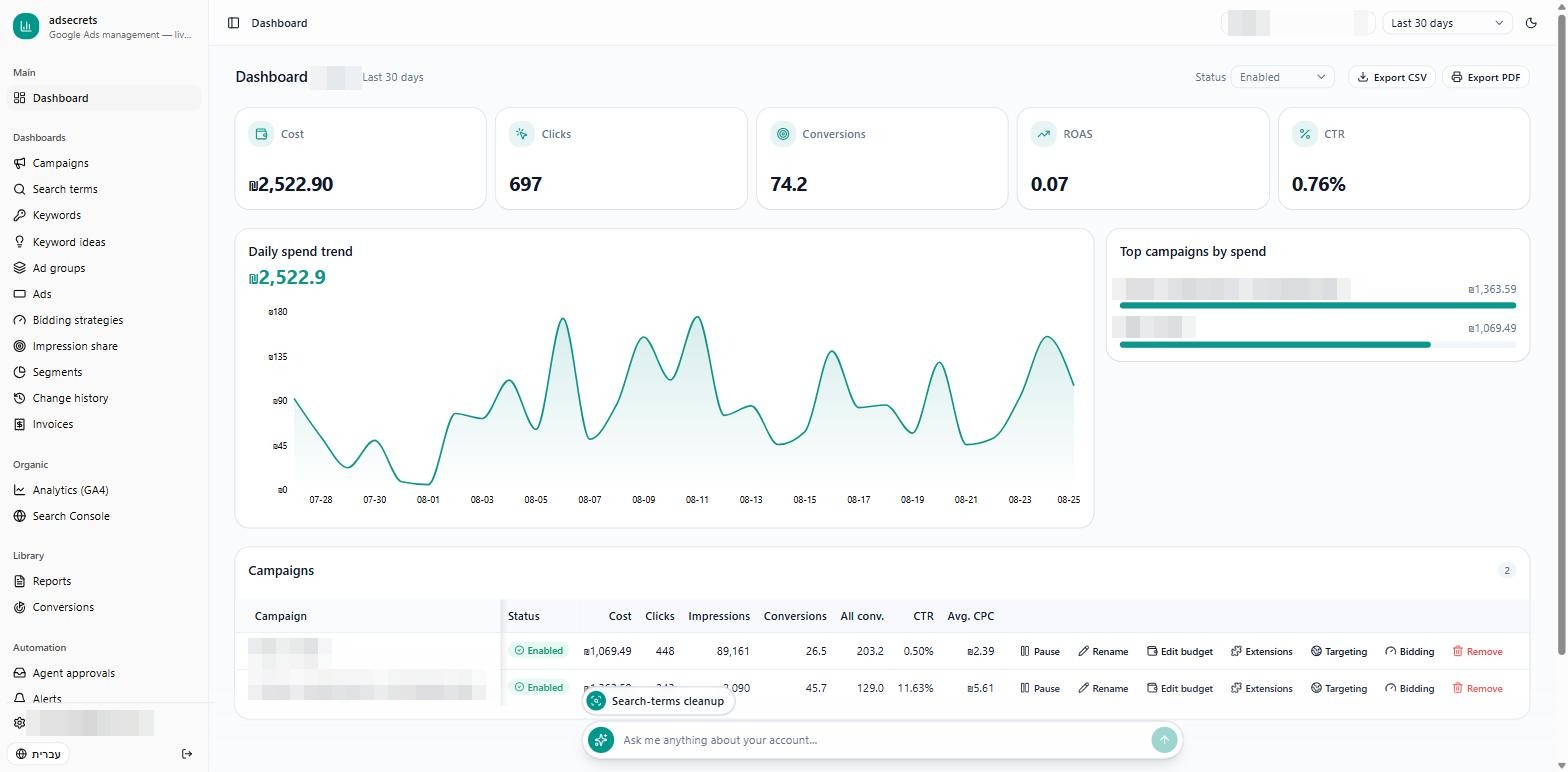
The adsecrets dashboard in English: cost, clicks and conversion cards, a daily spend chart, and the campaigns table
The dashboard — the whole account on one screen, in either language
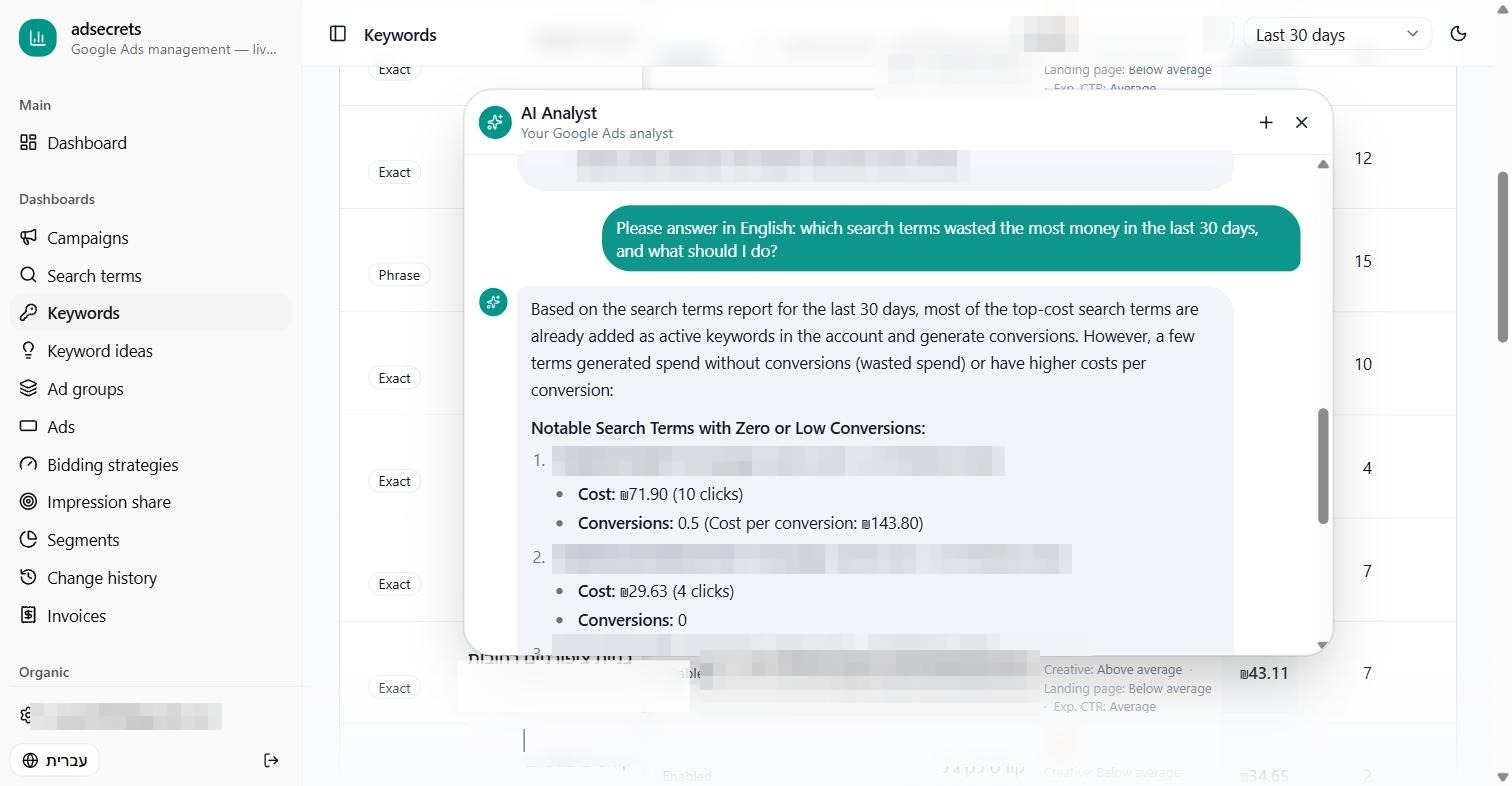
The adsecrets AI analyst answering, in English, which search terms wasted money — with the numbers and recommendations
The AI analyst answers in plain language — numbers and next steps included
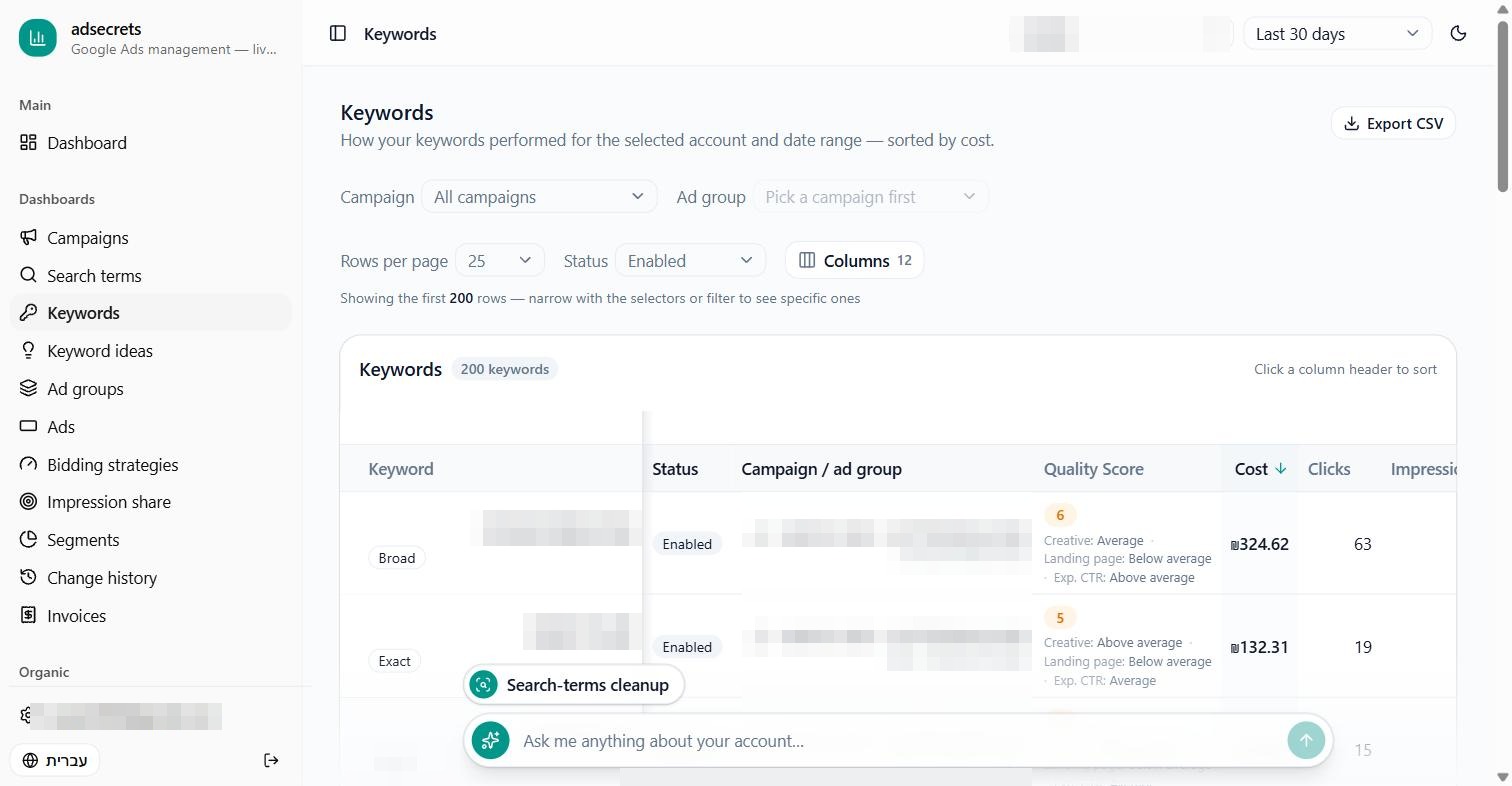
The adsecrets keywords report: quality scores, costs and conversions per keyword
The keywords report — quality scores and a per-report column picker

The reports

Eleven reports, in both languages.

Every report is read straight from your Google Ads account, over the date range you pick, and sorted by what actually matters — what it cost.

  • Campaigns

    Every campaign in the account, over the range you selected.

  • Keywords

    Performance per keyword — match type, Quality Score, and first-page and top-of-page bid estimates.

  • Search terms

    What people actually typed into Google before they saw your ad.

  • Ads

    Performance per ad, alongside its ad group and campaign.

  • Ad groups

    Performance per ad group, sorted by cost.

  • Segments

    How performance breaks down by device, country, and hour of day.

  • Impression share

    How much of the available impression share you captured — and how much you lost to budget or rank.

  • Bidding strategies

    Performance per strategy, its type, and the target set for it.

  • Change history

    What changed in the account, when, and through which interface. For privacy, we do not show who made the change.

  • Invoices

    Your account's billing invoices by month — subtotal, tax, and total, in the account's own billing currency.

  • Keyword ideas

    New keywords from Google's Keyword Planner, with monthly search volume and competition.

  • Which reports are available is determined by your plan and the permissions enabled for your account.

Security

Our red line.

Access to your account is the most sensitive thing we touch. These are the rules, and they are not negotiable.

Read the full privacy policy
  • The authorization is yours

    Every customer authorizes for themselves, through Google's own consent screen, on their own Google account. We never ask for your password and never receive it.

  • The token is encrypted — and goes back to no one

    Your authorization is stored encrypted and decrypted server-side solely in order to call Google itself. It is never returned to you, never handed to a third party, and never written to logs.

  • No cross-customer access

    One customer's authorization is never used to reach another's account. There is no "API over API" and no token passthrough.

  • Disconnect whenever you want

    Disconnecting from inside the product revokes the authorization at Google and deletes the encrypted token. Your data inside Google Ads is untouched.

  • The analyst — what is sent, and where

    When you run the AI analyst, the reporting data for the account you selected is sent to Anthropic to produce the analysis. Your data is not used to train models.

  • Spelled out, not implied

    The privacy policy states exactly what is collected, where it goes, and what is deleted — including the full Google API Services Limited Use disclosure.

FAQ

What people usually ask.

Do I have to hand over access to my account?

No. You authorize it yourself through Google's own consent screen, on your own Google account, and you can revoke it at any time — from inside the product or from your Google account's permissions page. We never ask for a password.

Does it change things in my account?

No. Today adsecrets is a reporting and analysis product: the dashboard and the chat connection are read-only. The analyst can propose actions — the proposal is shown to you for review, and adsecrets makes no change to your account without your explicit approval. Execution is not enabled for external customers.

How does it connect to Claude or ChatGPT?

adsecrets exposes a remote MCP endpoint at mcp.adsecrets.io. You add it as a data source in your chat client, authorize access to your adsecrets account, and ask in plain language from there. That connection exposes read tools only.

Hebrew or English?

Both. Hebrew RTL is the default and you can switch to English on a click. Metric names and labels come from the server, so the term is identical in the dashboard, the export, and the printed report.

Can I connect several accounts? Including an MCC?

Yes. After you connect, we show the accounts your Google account can reach — including accounts under a manager (MCC) account — and you choose which to connect. How many you can connect is determined by your plan.

What about the budget I pay Google?

It does not pass through us. You pay your media budget directly to Google, exactly as you do today. What you pay adsecrets is for the service only.

What does it cost?

Pricing has not been published yet. We are in early access — tell us about the account you manage and we will come back to you with the details.

Want to see your account like this?

adsecrets is in early access. Tell us about the account you manage and we will get back to you.